


Buyer's verdict
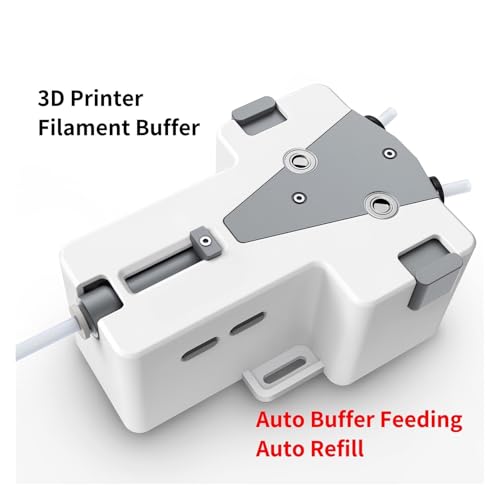
3D Printer Filament Buffer-Automatic Filament Feeding, Multi-Color & Backup Spool Switch, Reduces Tangles to Improve Print Quality, for FDM/FFF 3D Printers
Imagine spending 3 hours prepping a multi-color PLA cosplay prop print on your Prusa MK4, only to dash across the room mid-print to manually swap spools—missing the color transition window and ending up with a messy, mismatched layer. This Filament Buffer avoids that chaos! It automates multi-color spool switching: just program your color changes in your slicer (Cura, PrusaSlicer), and the buffer seamlessly switches between up to 4 spools (red, blue, black, etc.) at the exact right moment. No more ruined details or rushed trips to the printer—your multi-color prints get smooth, professional transitions that make your work look studio-quality.
Reasons to buy
What makes this pick worth considering
- Imagine spending 3 hours prepping a multi-color PLA cosplay prop print on your Prusa MK4, only to dash across the room mid-print to manually swap spools—missing the color transition window and ending up with a messy, mismatched layer. This Filament Buffer avoids that chaos! It automates multi-color spool switching: just program your color changes in your slicer (Cura, PrusaSlicer), and the buffer seamlessly switches between up to 4 spools (red, blue, black, etc.) at the exact right moment. No more ruined details or rushed trips to the printer—your multi-color prints get smooth, professional transitions that make your work look studio-quality.
- You know the heartbreak of a 12-hour ABS enclosure print failing 10 hours in—your filament spool ran out, and there’s no backup to save it. This buffer fixes that with automatic backup spool switching! Load a primary spool (e.g., black ABS) and a backup of the same material, and the buffer monitors filament levels. When the primary spool runs low, it instantly switches to the backup—no pauses, no wasted filament, no lost time. Whether you’re printing overnight or at work, you can trust your long prints to finish successfully, even if you forget to check spool levels.
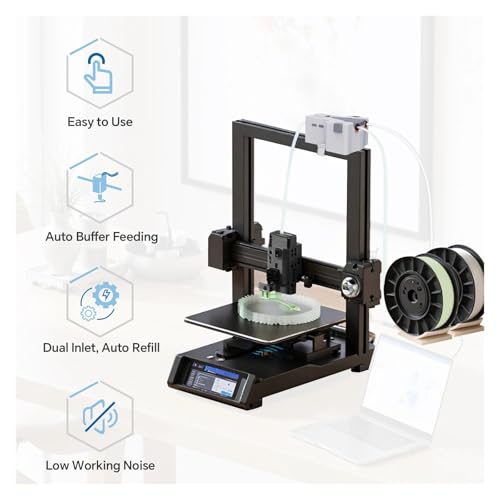
- Tired of filament tangles or uneven feeding ruining your prints? You’ve probably had PLA stringing or PETG under-extrusion because your spool was twisting, or the filament pulled too tight. This buffer’s built-in tension control and tangle-free guide keep filament feeding smoothly at a consistent rate. It avoids “filament drag” (a common issue with tall spool racks) and ensures your extruder gets a steady flow—no more gaps in layers, stringing between parts, or nozzle clogs. Your prints will have crisp edges, strong layer adhesion, and professional-quality finishes, even with tricky filaments like TPU or carbon-fiber blends.
Watch-outs
- You know the heartbreak of a 12-hour ABS enclosure print failing 10 hours in—your filament spool ran out, and there’s no backup to save it. This buffer fixes that with automatic backup spool switching! Load a primary spool (e.g., black ABS) and a backup of the same material, and the buffer monitors filament levels. When the primary spool runs low, it instantly switches to the backup—no pauses, no wasted filament, no lost time. Whether you’re printing overnight or at work, you can trust your long prints to finish successfully, even if you forget to check spool levels.
Full written guide
Long-form recommendation
Welcome everyone to this detailed review of the 3D Printer Filament Buffer – a revolutionary accessory designed to make your multi-color and long-duration prints smoother, more efficient, and drama-free. Imagine preparing a multi-color PLA cosplay prop print on your Prusa MK4, only to race across the room to manually swap spools at just the wrong moment. With this buffer, that chaos is a thing of the past.
One of its key features is the automatic multi-color spool switching capability. By simply programming your color transitions in popular slicers like Cura or PrusaSlicer, this clever device seamlessly switches between up to four spools. Whether you use vibrant reds, deep blues, or sleek blacks, the color changes occur precisely when needed, ensuring that your prints have smooth, professional transitions without any rushed or mismatched layers.
Equally impressive is its automatic backup spool function. Picture a 12-hour long ABS print where you find yourself mid-print with an almost empty spool. With this buffer, a primary spool paired with a backup material guarantees that when your primary runs low, the buffer automatically switches to the backup. No pauses, no wasted filament, and no missed steps. This feature is excellent for overnight prints or long production runs, where a single filament jam can be a costly setback.
Filament tangles, uneven feeding, and filament drag are further challenges that this product adeptly addresses. Its built-in tension control and tangle-free guide help deliver a consistent filament flow, eliminating common issues like PLA stringing or PETG under-extrusion. Not only does this ensure crisp, clean edges and strong layer adhesion, but it also improves your overall printer performance, especially with more challenging materials like TPU or carbon-fiber blends.
The device shines with its user-friendly plug-and-play installation. You can easily mount it on your printer frame or nearby shelf using the provided brackets. It works seamlessly with the majority of FDM/FFF 3D printers, including popular models like the Ender 3, Prusa, Bambu Lab, and Voron, and accommodates standard filament diameters from 1.75mm to 2.85mm. This ease of configuration makes it an excellent option even for those new to 3D printer mods.
While this buffer stands out against similar products on the market by providing both multi-color and backup capabilities in one package, it is worth noting that users with very niche or customized printer setups might require additional adjustments. For optimal results, ensure that your slicer settings are calibrated correctly and always keep spare backup spools ready.
In summary, this 3D Printer Filament Buffer is a game-changer for enthusiasts looking to save time, reduce waste, and achieve professional-quality prints. It is ideally suited for makers, artists, and professionals who frequently experiment with different filaments and multi-color prints. Thank you for watching, and happy printing, everyone!
Compare before you buy
More guides readers should check next

ErGear Dual Monitor Stand, Heavy Duty Adjustable Monitor Desk Mount for 2 Screens up to 32 Inches, Fully Adjustable Height, Tilt, Swivel, Rotate, Supports 17.6 lbs per Monitor Arm, Easy Installation
Best forDesk workers building a cleaner, more ergonomic setup
- Computer Compatibility - To ensure compatibility of the dual monitor mount, each of your monitors must meet three conditions: Firstly, screen size range: 13 to 32 inches. Secondly, screen weight limit: 17.6lbs. Thirdly, there must be VESA mounting holes on the back of the monitor screen that are spaced 75x75 mm or 100x100 mm apart. Please make sure that your monitor meets all of the above conditions before purchasing, if you are still unsure, you can seek help from customer service.
- Versatile Compatibility - With a 30.71“ wide arm span and 16.3” high bar, this dual monitor arm accommodates two 32” monitors, providing a very large amount of adjustability for your work use and allowing you to enjoy an immersive viewing experience.

Stylus Pen for iPad 6th-11th Generation-2X Fast Charge Active Pencil Compatible with 2018-2025 Apple iPad Pro 11"/12.9"/M4, iPad Air 3/4/5/M2/M3,iPad mini 5/6 Gen-White
Best forFrequent travelers who need a reliable carry-on tech fix
- 【Compatible with 2018-2025 iPad & iPad Pro】The stylus supports for iPad series 2018-2025 model: iPad Pro 13" (M4), iPad Pro 12.9"(3rd/4th/5th/6th), iPad Pro 11"(All Generations), iPad Air M3/M2/5th/4th/3rd Gen, iPad 11th/10th/9th/8th/7th/6th, iPad Mini 6th/5th Gen. Please confirm your devices before you place an order, another model is invalid
- 【Not compatible with models before 2018】The stylus doesn't support iPad pro 1st&2nd, iPad pro 10.5", iPad pro 9.7", iPad 1 to 5 Gen, iPad mini 1 to 4 Gen, iPad Air 1st/2nd Gen versions of iPad. Not Compatible With iPhone, Android, Microsoft devices.iPad 10gen cannt use magnetic attraction.

JSAUX USB C to DisplayPort Adapter 4K@60Hz, Type C to Display Port Cable Adapter Compatible with iPhone 17 Pro/15, MacBook Pro 2019 2018, Surface Book, Dell XPS, Samsung Galaxy S24 S23 Note 20-Grey
Best forFrequent travelers who need a reliable carry-on tech fix
- 【No interference for WiFi use】:Unieque anti-interference design, the usbc conncetor of this c to display port adapter is implanted with a tinplate, this will block off the signal inteference for WiFi, and you will get full WiFi signal while using this adapter
- 【Plug & Play】:Plug-and-play, no adapter or driver/software required. Perfect USB Type C to DP Cable for your USB C MacBook Pro 15inch or 13inch (from 2016), iMac(2017), Surface Book 2, Dell XPS 13/15, HP Envy 13, Pixelbook, Galaxy Book and more, drive one or two DisplayPort monitors/displays, up to 4K@60Hz resolution. Compatible with DP-enabled TVs/Monitors/Projectors for both video and audio transfer